Multiplayer
Several players can play one DarkRoast game together, on the same network or over the internet. One player hosts and plays too, and the others join. Everyone sees the others as an animated body (the built-in cowboy, or your game’s own hero), walking, running and raising their gun as they do.
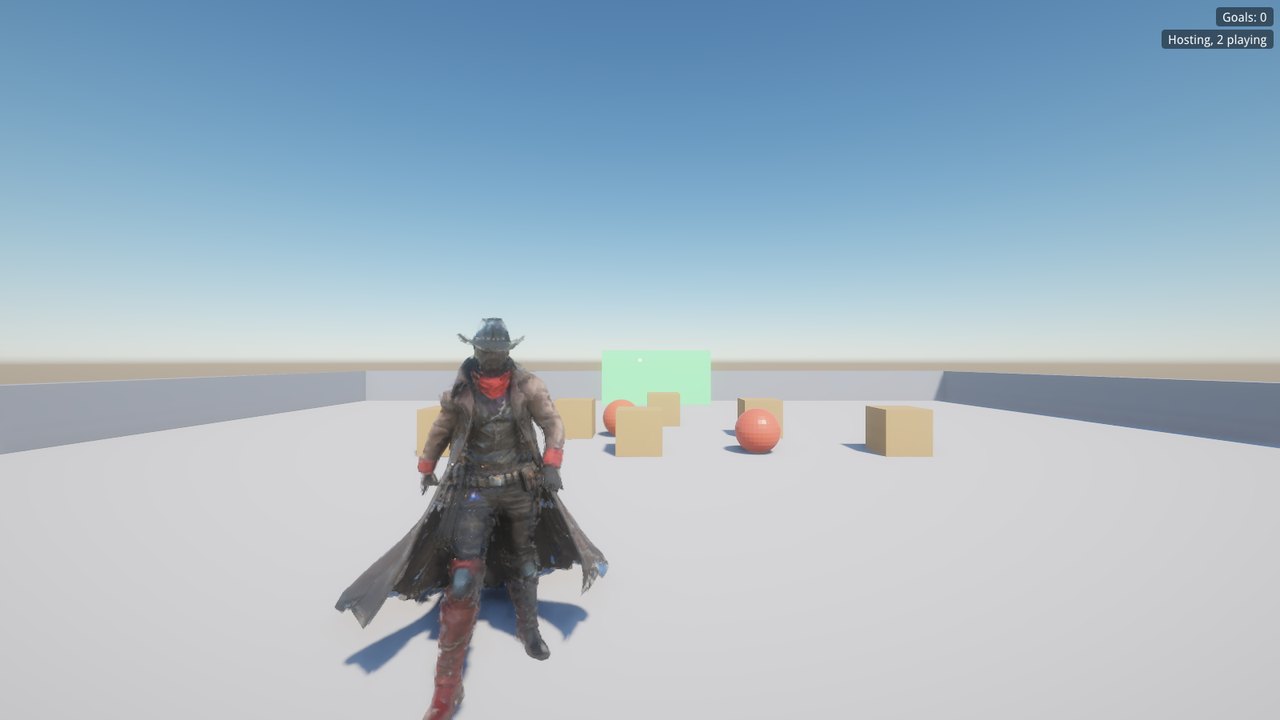
Try it
Download the Multiplayer Demo from the download page and unzip it. Start it and choose Host a game, then start it again and choose Join a game on this PC. On another PC on your network, run it from a command prompt with the host’s address:
"Multiplayer Demo.exe" --host
"Multiplayer Demo.exe" --join 192.168.1.20
Push the crates and balls into the green goal; the score is shared. The blue button (E) drops another ball for everyone. Any packaged game, and blendforge.exe itself, takes the same --host [port] and --join address[:port] options. The port is 27960 unless you give one.
How it works
- Each player moves their own character. Your movement is smooth on your machine; the others see you about a tenth of a second later.
- The host runs the world. It simulates the physics of shared objects and sends their positions to everyone 20 times a second. The other machines play them back smoothly.
- Players have colliders, so you bump into each other. You can push the host’s crates, because your body is part of the host’s simulation.
- Levels follow the host. When the host loads a level, everyone loads it. Players who join late load the host’s level and get what has already changed: spawned objects and removed ones.
- Joining players start beside the Player Start, not inside the host.
Replicated objects
In Blender, tick Replicate (BlendForge tab → Object Components) on anything that moves and must be in the same place for everyone: crates, balls, doors, platforms, enemies. Objects that don’t move need nothing.
- On the joining players’ machines a replicated object follows the host. A dynamic body isn’t simulated there; it moves as the host’s does.
- Tick Replicate on a Template too, and copies the host makes with
spawn()appear for everyone. Objects the host destroys disappear for everyone. - Visibility is shared too:
obj.visible = falseon the host hides it everywhere.
Scripting
net.host(port?, max_players?), net.join(address, port?), net.leave() | Host, join or leave from a script, for example from a title menu’s buttons. A host takes up to 8 players unless told otherwise (net.max_players()); more are turned away. Joining happens in the background, and on_connected follows. |
net.set_name("Will"), net.name() | What this player is called; the others see it in net.players(). Sent when joining, and again when it changes. Keep it with save("name", ...). |
net.advertise{game = "My Game", mode = "dm", started = false} | (Host) What a LAN search shows about this game: any table. net.advertise(false) stops answering searches. |
net.lan_games(game?) | Games hosted on the local network, each {address, port, host, players, max, info} (host is the host player’s name, info what they advertise); only that game’s, if given. Call it every frame a game list is open: it keeps the search going. Join one with net.join(g.address, g.port). |
net.active(), net.connected() | Hosting or joining; actually in a game. |
net.is_host(), net.is_client() | Which side this machine is. In single player, both are false. |
net.id() | This player’s number: the host is 1, and the others are 2, 3… in order of joining. |
net.players() | Everyone in the game, each {id, position, entity, is_me, name, crouching}. entity is the body drawn for that player. |
net.send("name", value, to?) | A message to everyone else, or to one player’s id. The value can be a number, text, true/false, a vec3 or a table. |
net.set("key", value), net.get("key", default?) | State the host shares with everyone, such as scores and the round number. The host sets it; everyone reads it. |
spawn_model("outlaw.glb", pos, yaw, true) | On the host: loads a model file for everyone (with true). The others get a copy that follows the host’s, its own moving parts included (a walking enemy). Its scripts and AI run on the host only. |
obj.net_id, net.object(id) | The number every machine knows a replicated object by, and the object with that number here. Put it in a message to point at an object, e.g. which enemy a player hit. |
net.give(obj, player_id), net.owner(obj), net.mine(obj) | (Host) Hands a replicated object to a player: their machine simulates it (the car they drive, physics and all) and everyone else follows it. net.give(obj, 1) takes it back; a player who leaves gives theirs back. net.mine(obj): this machine moves it. The Racing Demo gives each player a car this way. |
net.avatar("models/hero.glb") | How the other players look: a model with player_idle, player_walk, player_run (and player_jump) actions. What’s in its right hand is its gun: when a player aims (player_aim), the others see the arm come up and point where they look. Show their gun of the moment through net.players()’s entity. |
ui.input("Host's address", "127.0.0.1") | A text box in a menu (inside ui.menu): returns what’s typed, for a Join button. |
Animations the host’s scripts play on a replicated object, or on anything under one (obj:play_animation, crossfade, stop_animation, and auto_animate for Character Animation), play on every machine. Character Animation also runs on each machine by itself, from the movement it sees.
These callbacks work in the level script and in objects’ scripts. Objects’ scripts get self first.
function on_connected(id) end                 -- you joined (id: your number)
function on_disconnected(why) end             -- "refused" (no host there) or "lost"
function on_player_joined(id) end             -- someone joined (everyone hears it)
function on_player_left(id) end
function on_net_message(name, value, from) end
Who does what
Every machine runs the level’s scripts, so menus, HUD text, sounds and effects work as usual. Anything that should happen once, such as counting a goal, spawning a ball or opening a door, belongs on the host: check net.is_client(), and have clients ask the host with a message. The demo’s button:
function on_interact(self, player)
  if net.is_client() then
    net.send("spawn_ball", true, 1)           -- ask the host (player 1)
  else
    spawn("Ball", self.position + vec3(0, 0, 2.5))
  end
end

-- in the level script
function on_net_message(name, value, from)
  if name == "spawn_ball" and net.is_host() then
    spawn("Ball", find("BallButton").position + vec3(0, 0, 2.5))
  end
end
And its goal, counted on the host and shared with net.set:
function on_trigger_enter(self, other)
  if net.is_client() or other.is_player then return end
  net.set("goals", net.get("goals", 0) + 1)
  other:destroy()
end
-- everyone shows it: ui.set("goals", "Goals: " .. net.get("goals", 0))
Game lists and lobbies
Games hosted on the same network find each other: a host answers LAN searches (a UDP broadcast on port 27950, sent on every network adapter) with what it net.advertises, and net.lan_games lists the hosts that answered. A game list is a button per game:
for i, g in ipairs(net.lan_games("My Game")) do
  if ui.button("Join " .. g.host .. " (" .. g.players .. "/" .. g.max .. ")##" .. i) then
    net.join(g.address, g.port)
  end
end
A lobby is a few lines on top: the host shows net.players() and a Start button; Start sends a message and sets net.set("started", true); a player who joins and finds started false waits in the lobby, and one who joins later goes straight in. Data Rustlers’ start menu and lobby work this way.
A co-op shooter: Data Rustlers
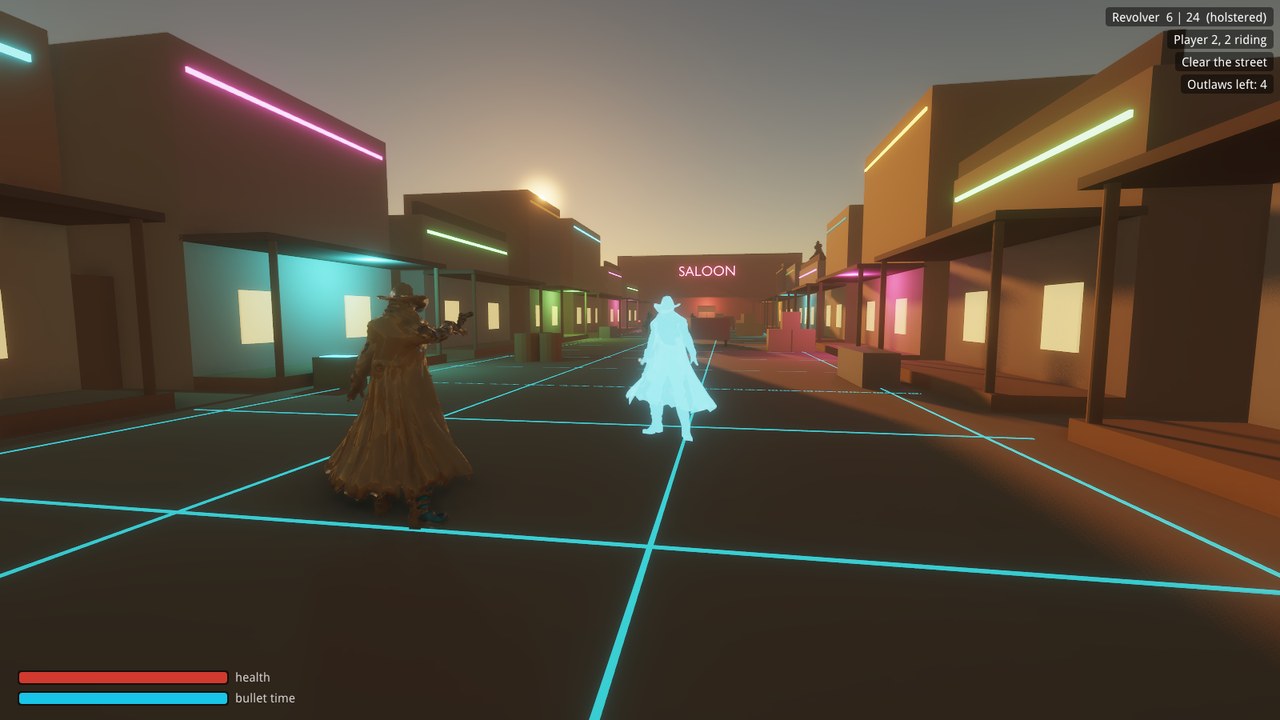
Data Rustlers, on the download page, plays its whole slice in co-op for 2–4 players: Host co-op opens a lobby, and the others pick it from the list of games on their start menu (or join by address). It’s built on the same pieces:
- The host runs the town. Outlaws, the rooftop sniper and the boss are loaded with
spawn_model(file, pos, yaw, true), so everyone sees them run between cover, draw, shoot and fall. Their scripts and AI run on the host, picking the nearest player to go after. - Hits go to the host. A joining player’s shot is worked out on their own machine; when it hits an outlaw it sends the host
net.send("hit", {id = who.net_id, ...}, 1), and the host applies the damage. When an outlaw hits a joining player, the host tells that player. - Shared state and effects: the phase, wave, the team’s bullet-time meter and the boss’s health through
net.set; titles, enemy tracers, deaths and ammo drops as messages. - Shared bullet time: anyone can call it; the host slows the game for everyone.
- Down, not out: a player who goes down gets back up beside a partner after a few seconds, while anyone’s still standing.
- The others look like the hero (
net.avatar), guns and all.
Deathmatch
Data Rustlers also has a deathmatch for 2–4 players: Host deathmatch on the start menu (or switch the lobby to it), and the others join the same way. Same street, no outlaws, no bullet time; first to 10 kills, or the most after 6 minutes. It’s game script only, on the same pieces:
- Player hits go through the host. A shot that hits another player’s body (its collider is named
Player N Collider) sends the host the damage; the host passes it to that player, who takes it and, at zero, tells the host who killed them. - The host keeps score in
net.set("score", ...), so every HUD shows the same board, and sends the kill feed and the dead player’s glitch-out as messages. - Respawns come a few seconds later at the spot furthest from everyone else, with a fresh revolver. When the host’s clock or the kill limit ends it,
finishcarries the winner to everyone.
Over the internet
On a home network, games show up in the list by themselves. To join by address, use the host PC’s local address (ipconfig shows it, e.g. 192.168.1.20). Over the internet, the host forwards UDP port 27960 on their router to their PC, and players join the host’s public address. Windows Firewall asks the host to allow the game the first time; allow it on private networks.
Limits
- Game lists find games on the local network only; over the internet, players join by address (there’s no master server yet).
- Shared objects are shown as the host has them, a moment behind; nothing is predicted on the joining players’ machines.
- Joining players can’t pick up replicated objects (push them instead).
- Each player’s shots are worked out on their own machine, against what they see (a moment behind the host). That’s kind to the shooter, but there’s no cheat protection.
The demo is built by samples\make_multiplayer_demo.py in the Samples & docs download, and samples\multiplayer_demo.blend has its scripts.